Retrieval Models
Retriever-only learners use embedding-based retrieval models to perform ontology learning tasks without using LLMs. Retriever-only learners operate by: 1) Indexing: Creating embeddings for all examples in the training data, 2) Retrieval: Finding the most similar examples to the input query based on embedding similarity. The methodology behind retriever-only learners is founded on vector representations of ontological elements, allowing for semantic comparison in a high-dimensional space.
By transforming terms, concepts, and relationships into embeddings through pre-trained language models, the system can measure semantic similarity between ontological components without relying on explicit linguistic patterns or rules. This approach leverages the distributional hypothesis—that semantically similar terms appear in similar contexts—to identify relationships between entities. The system then employs deterministic aggregation methods like majority voting or weighted consensus to derive predictions from the retrieved examples. This methodology is computationally efficient compared to LLM-based approaches and particularly effective for tasks with well-defined patterns across domain-specific ontologies.
Loading Ontological Data
We start by importing necessary components from the ontolearner package, loading ontology, and doing train-test splits.
from ontolearner import AutoRetrieverLearner, AgrO, train_test_split, evaluation_report

ontology = AgrO()

ontology.load()

ontological_data = ontology.extract()

train_data, test_data = train_test_split(ontological_data, test_size=0.2, random_state=42)
Note
AutoRetrieverLearner: A wrapper class to easily configure and run retriever-based learners.
Initialize Learner
Before defining the Retriever learner, choose the task you want the Retriever to perform. Available tasks has been described in LLMs4OL Paradigms. The task IDs are: ‘term-typing’, ‘taxonomy-discovery’, ‘non-taxonomic-re’.
task = 'non-taxonomic-re'
Next, initiate the learner by specifying top_k parameter and load the desired sentence-transformer based model as a retriever.
ret_learner = AutoRetrieverLearner(top_k=5)

ret_learner.load(model_id='sentence-transformers/all-MiniLM-L6-v2')

# Index the model on the training data for LLMs4OL task
ret_learner.fit(train_data, task=task)

predicts = ret_learner.predict(test_data, task=task)

truth = ret_learner.tasks_ground_truth_former(data=test_data, task=task)

metrics = evaluation_report(y_true=truth, y_pred=predicts, task=task)

print(metrics)
You will see a evaluations results.
Hint
OntoLearner supports various retrieval models, including:
Various sentence-transformers models
T5 models (e.g., “google/flan-t5-base”)
Nomic-AI models
When working with large contexts, the retriever model may encounter memory issues. To address this, OntoLearner’s AutoRetrieverLearner provides a batch_size argument. By setting this, the retriever computes similarities in smaller batches instead of calculating the full cosine similarity across all stored knowledge embeddings at once, reducing memory usage and improving efficiency. To use this, simply:
ret_learner = AutoRetrieverLearner(top_k=5, batch_size=1024)
Pipeline Usage
Similar to the LLM learner, Retrieval learner is also callable via the streamlined LearnerPipeline class. In this section we use retriever-only mode by providing retriever_id only.
# Import core components from the OntoLearner library
from ontolearner import LearnerPipeline, AgrO, train_test_split

# Load the AgrO ontology, which includes structured agricultural knowledge
ontology = AgrO()
ontology.load()  # Load ontology data (e.g., entities, relations, metadata)

# Extract relation instances from the ontology and split them into training and test sets
train_data, test_data = train_test_split(
    ontology.extract(),      # Extract annotated (head, tail, relation) triples
    test_size=0.2,           # 20% for evaluation
    random_state=42          # Ensures reproducible splits
)

# Initialize the learning pipeline using a dense retriever
# This is retriever-only mode (no LLM component)
pipeline = LearnerPipeline(
    retriever_id='sentence-transformers/all-MiniLM-L6-v2',  # Hugging Face model ID for retrieval
    batch_size=10,       # Number of samples to process per batch (if batching is enabled internally)
    top_k=5              # Retrieve top-5 most relevant support instance per query
)

# Run the pipeline on the training and test data
# The pipeline performs: fit() → predict() → evaluate() in sequence
outputs = pipeline(
    train_data=train_data,
    test_data=test_data,
    evaluate=True,           # If True, computes precision, recall, and F1-score
    task='non-taxonomic-re'  # Specifies that we are doing non-taxonomic relation prediction
)

# Print the evaluation metrics (precision, recall, F1)
print("Metrics:", outputs['metrics'])

# Print the total elapsed time for training and evaluation
print("Elapsed time:", outputs['elapsed_time'])

# Print the full output dictionary (includes predictions)
print(outputs)
Note
For RAG with LearnerPipeline see: https://ontolearner.readthedocs.io/learners/rag.html.
Hint
See Learning Tasks for possible tasks within Learners.
Customization
You can easily customize AutoRetrieverLearner by providing your own base retriever.
Example:
from ontolearner.learner import AutoRetrieverLearner
from ontolearner.learner.retriever import NgramRetriever

# Create a custom retriever (default is AutoRetriever)
retriever_model = NgramRetriever()

# Use it as the base retriever in the learner
learner = AutoRetrieverLearner(base_retriever=retriever_model)

# Load a model for retrieval or augmentation
learner.load(model_id='...')
Note
The
base_retrievermust implement theAutoRetrieverinterface.You can use any compatible retriever, e.g.,
NgramRetriever,Word2VecRetriever, or your own custom retriever.This allows combining semantic, n-gram, or hybrid retrieval pipelines easily.
Retriever Collection
NgramRetriever
The NgramRetriever is a simple, interpretable text retriever based on traditional n-gram vectorization methods, such as CountVectorizer and TfidfVectorizer. It ranks documents using cosine similarity of n-gram vectors. This is useful for baseline retrieval, keyword matching, or small-scale text search tasks. The following code shows how to import NgramRetriever and load desired model with desired arguments.
    from ontolearner.learner import AutoRetrieverLearner
    from ontolearner.learner.retriever import NgramRetriever

retriever = NgramRetriever(ngram_range=(1,2), stop_words='english')

learner = AutoRetrieverLearner(base_retriever=retriever)

learner.load(model_id="tfidf")  # or "count"
Note
For desired arguments refer to scikit-learn > TfidfVectorizer or scikit-learn > CountVectorizer
Word2VecRetriever
Word2Vec retriever encode documents and queries using pre-trained word embeddings. Each document is represented by the average of its word vectors, and retrieval is done via cosine similarity between query vectors and document vectors. The following code shows how to use Word2VecRetriever inside learner model:
from ontolearner.learner import AutoRetrieverLearner
from ontolearner.learner.retriever import Word2VecRetriever

retriever = Word2VecRetriever()

learner = AutoRetrieverLearner(base_retriever=retriever)

learner.load(model_id="path/to/word2vec.bin")  # Load pre-trained Word2Vec vectors
Note
Learn more about Word2Vec at https://www.tensorflow.org/text/tutorials/word2vec
GloveRetriever
GloVe is an unsupervised learning algorithm for obtaining vector representations for words. Training is performed on aggregated global word-word co-occurrence statistics from a corpus, and the resulting representations showcase interesting linear substructures of the word vector space. Here, the GloveRetriever operates based on GloVe model as shown in the following:
from ontolearner.learner import AutoRetrieverLearner
from ontolearner.learner.retriever import GloveRetriever

retriever = GloveRetriever()

learner = AutoRetrieverLearner(base_retriever=retriever)

learner.load(model_id="path/to/glove.txt")  # Load pre-trained GloVe vectors
Hint
In both Word2Vec and GloVe retrievers, If a word in a word is not in the embedding vocabulary, it is ignored.
Note
Refer to the GloVe paper at GloVe: Global Vectors for Word Representation to learn more about this model.
CrossEncoderRetriever
Untill now, the OntoLearner AutoRetriever (base retriever for AutoRetrieverLearner) were using a Bi-Encoder architecture for retrievals. It is important to understand the difference between Bi- and Cross-Encoder. The following diagram shows the differences:
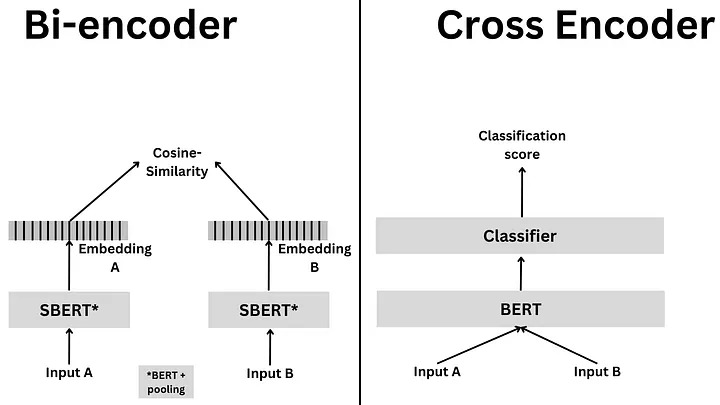
Bi-Encoders produce for a given sentence a sentence embedding. We pass to a BERT independently the sentences A and B, which result in the sentence embeddings u and v. These sentence embedding can then be compared using cosine similarity. In contrast, for a Cross-Encoder, we pass both sentences simultaneously to the Transformer network. It produces then an output value between 0 and 1 indicating the similarity of the input sentence pair. A Cross-Encoder does not produce a sentence embedding. Also, we are not able to pass individual sentences to a Cross-Encoder (Reference: Sentence-BERT > Cross-Encoder).
Here, in the OntoLearner, we implemented a CrossEncoderRetriever, a hybrid dense retriever that combines a BiEncoder for fast candidate retrieval and a CrossEncoder for accurate reranking. Overall CrossEncoderRetriever uses Bi-Encoder based model for retrieval and Cross-Encoder model for reranking. This provides an efficient and accurate alternative to pure Cross-Encoder or pure Bi-Encoder approaches. To use CrossEncoderRetriever simply follow the following steps:
from ontolearner.learner import AutoRetrieverLearner
from ontolearner.learner.retriever import CrossEncoderRetriever

retriever = CrossEncoderRetriever(bi_encoder_model_id='Qwen/Qwen3-Embedding-8B') # pass the bi-encoder model ID used in the first-stage

learner = AutoRetrieverLearner(base_retriever=retriever)

learner.load(model_id="cross-encoder/ms-marco-MiniLM-L12-v2")  # Model ID for the CrossEncoder (reranking model) here!
                                                               # When .load(...) is instantiated, both the bi-encoder and cross-encoder models will be loaded.
Note
Learn more about Retrieve and Rerank approach at Sentence Transformers > Usage > Retrieve & Re-Rank.
LLMAugmentedRetriever
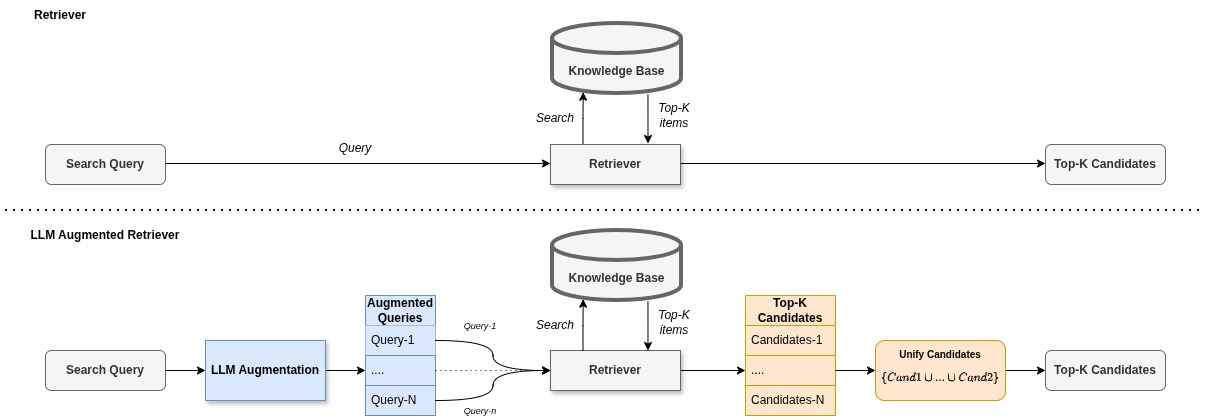
The LLM-Augmented retriever improves retrieval quality by expanding each query into multiple augmented variants using an LLM (e.g., GPT-4). The following diagram shows how LLM-Augmented retriever operates in comparison to usual retriever approach.
There are two usage modes:
1. Online augmentation (using LLMAugmenterGenerator): This mode calls the LLM directly to generate augmentation candidates.
# Step 1 — Create the generator
from ontolearner.learner.retriever import LLMAugmenterGenerator
llm_augmenter_generator = LLMAugmenterGenerator(model_id='gpt-4.1-mini', token = '...', top_n_candidate=10)

# Step 2 — Generate augmentations for a dataset
tasks = ['term-typing', 'taxonomy-discovery', 'non-taxonomic-re']
augments = {"config": llm_augmenter_generator.get_config()}
for task in tasks:
    augments[task] = llm_augmenter_generator.augment(data, task=task)

# Step 3 — Save augmentations
from ontolearner.utils import save_json
save_json("augment.json", augments)
The online augmentation is designed to avoid multiple calls to the models that may lead into expensive API usage and waiting time. Once the augmenter generator output is stored, it can be used for next stage.
2. Offline augmentation (recommended for large experiments): Instead of calling the LLM repeatedly, you load the previously saved augmentations.
# Step 1 — Load augmenter
from ontolearner.learner.retriever import LLMAugmenter
augmenter = LLMAugmenter("augment.json")

# Step 2 — Attach it to the retriever
from ontolearner.learner.retriever import LLMAugmentedRetriever
from ontolearner.learner import LLMAugmentedRetrieverLearner

base_retriever = LLMAugmentedRetriever()
learner = LLMAugmentedRetrieverLearner(base_retriever=base_retriever)
learner.set_augmenter(augmenter)
learner.load(model_id="Qwen/Qwen3-Embedding-8B") # path to desired retriever model.
Here the LLMAugmentedRetrieverLearner is the high-level wrapper that orchestrates the loading a retriever model, attaching the LLMAugmentedRetriever, automatically applying LLM-based query expansion during training and prediction, and computing ground truth and returning predictions.
Component |
Purpose |
|---|---|
|
Calls an LLM (GPT-4, GPT-3.5, etc.) to generate augmentation data. |
|
Loads offline augmentations ( |
|
Expands each query using augmentations before retrieval. |
|
Applies the learner pipeline using the augmented retriever. |
Example: Using LLMAugmentedRetrieverLearner for Taxonomy Discovery
from ontolearner.learner.retriever import LLMAugmenterGenerator, LLMAugmentedRetriever, LLMAugmenter
from ontolearner import LLMAugmentedRetrieverLearner, Wine, train_test_split, evaluation_report

ontology = Wine()
ontology.load()
ontological_data = ontology.extract()
train_data, test_data = train_test_split(ontological_data, test_size=0.2, random_state=42)

task="taxonomy-discovery"

llm_augmenter_generator = LLMAugmenterGenerator(model_id='gpt-4.1-mini', token = 'your_openai_token', top_n_candidate=10)
augments = {"config": llm_augmenter_generator.get_config()}
augments[task] = llm_augmenter_generator.augment(ontological_data, task=task)

base_retriever = LLMAugmentedRetriever()
learner = LLMAugmentedRetrieverLearner(base_retriever=base_retriever)

learner.set_augmenter(augments)
learner.load(model_id="Qwen/Qwen3-Embedding-8B")

# Train, Predict, and Evaluate
learner.fit(train_data, task=task)
predictions = learner.predict(test_data, task=task)
truth = learner.tasks_ground_truth_former(test_data, task=task)
metrics = evaluation_report(truth, predictions, task=task)
print(metrics)